Before opening a confidential CAD export or GLB in a web tool, establish where its bytes go. A browser interface can upload a model to a server, process it locally, or combine both paths. The interface alone does not establish which architecture it uses.
Local processing can avoid sending selected model data to a remote processor. It does not automatically establish compliance with an NDA, guarantee offline operation, or prove that every component of an application is safe. This guide explains the data flow and the checks a team can use before approving a workflow.
Decide which data may leave the workstation
Treat geometry, textures, filenames, embedded metadata, and generated previews as separate data classes. A service might keep the mesh local while uploading a thumbnail or recording a filename in an error report. Decide which of these transfers your project permits before evaluating the tool.
For an upload service, examine access controls, retention, deletion, backups, and the service agreement. For a local tool, examine the application code, external dependencies, browser storage, and telemetry. Either architecture needs an assessment appropriate to the data. A contractual restriction cannot be resolved by choosing a technology name.
Follow the local processing path
The File API lets a page read files selected by the user. A typical local 3D workflow reads those bytes into an ArrayBuffer, parses the asset, renders a preview, and creates an output file for download.
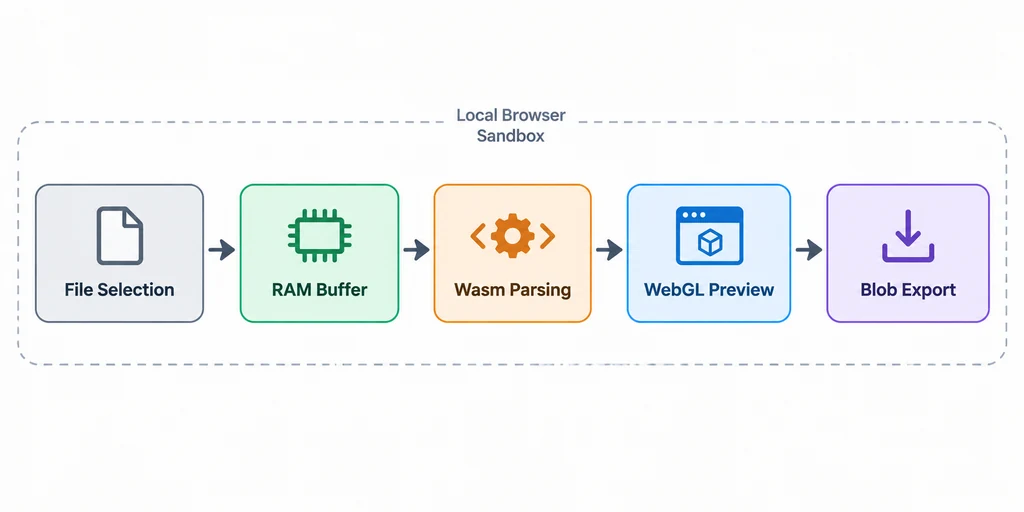
JavaScript can perform parsing and application logic. WebAssembly can supply compatible compiled components, including particular geometry or texture codecs. It is optional for a local workflow. A library should not be described as a C++ or Rust WebAssembly engine merely because it can be used alongside one.
A Web Worker can move suitable work away from the page's main thread. The renderer submits geometry and textures to the graphics API. Export code can construct a Blob and offer a browser download. None of these steps requires a model upload by itself, but surrounding application code can still make network requests.
Memory copies, decoded textures, codec buffers, and the renderer's allocations all contribute to peak memory use. File size alone does not predict whether processing will finish on a particular device. Measure representative assets instead of promising instant execution or a universal browser memory limit.
Compare the actual deployment
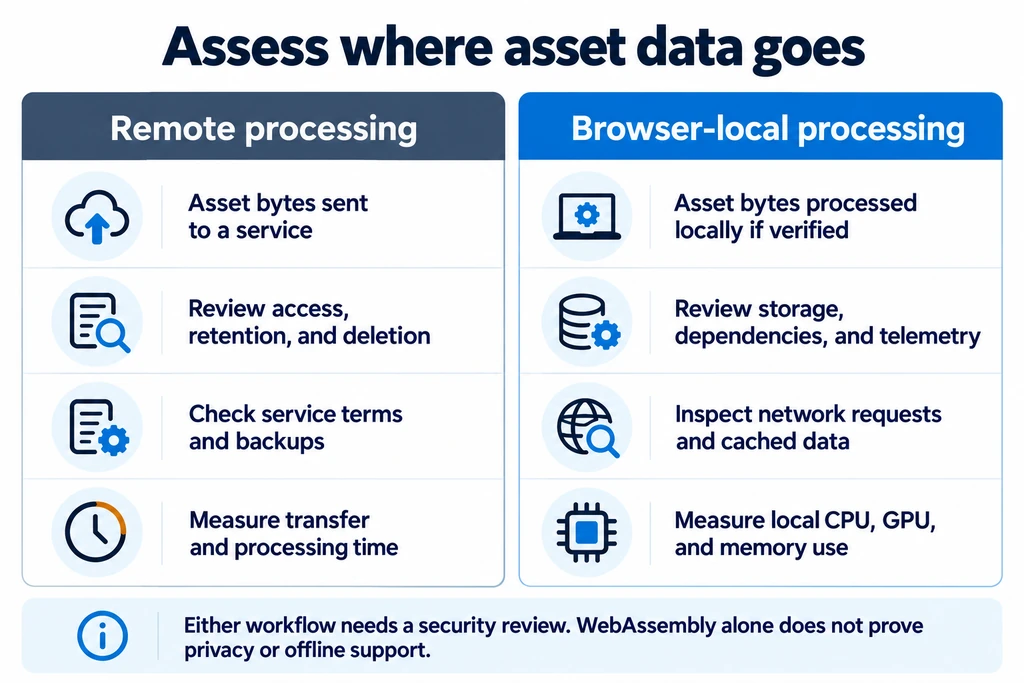
The relevant comparison is the application's behavior under your deployment conditions:
| Question | Remote processing | Local processing |
|---|---|---|
| Where is the selected asset processed? | On the service's infrastructure for the remote stages. | On the user's device for the local stages. |
| What affects completion time? | Transfer, queues, server work, and response handling. | Device resources, decoding, computation, and export. |
| What must be reviewed? | Provider access, storage, retention, and contractual terms. | Application code, dependencies, telemetry, and local persistence. |
| Can it work offline? | Remote stages require a connection. | Only if all required code and resources are available locally. |
These are evaluation questions, not guarantees about every service. Closing a tab is not a verified secure-erasure procedure. Data written to IndexedDB, browser file storage, caches, or downloaded files can persist beyond the tab's lifetime. See MDN's browser storage guidance.
Test with a non-sensitive asset
Use a harmless model with recognizable filenames and metadata. Record the application build, browser version, and operations you exercise.
- Open the browser's Network panel before loading the application. Keep the full request list available rather than filtering only Fetch/XHR.
- Import the model and exercise inspection, texture replacement, conversion, and export if the tool supports them.
- Inspect request URLs, payloads, WebSocket traffic, and reporting endpoints for asset content or identifying metadata. A lack of POST requests alone does not establish that no data was transmitted.
- Inspect browser storage for retained files, previews, or asset metadata.
- Repeat with networking disabled after the necessary resources are available. Record which operations still work and which dependencies fail.
- Reconnect and check for deferred requests. Repeat after changes to the application or its dependencies.
A successful offline run demonstrates that the exercised operations can run without the network under those conditions. It does not prove the absence of later uploads or cover every application path. For restricted data, combine observations with a code and dependency review under the organization's own approval process.
Apply the result to a production workflow

The interface above illustrates local material review. It is not evidence that a deployed application implements every pictured feature or has passed a security audit.
For a tool such as GLB Studio Pro, verify the specific build you intend to use. Record whether model bytes, previews, filenames, or diagnostics leave the device. Distinguish application requests for fonts or libraries from transfers of model data. If an offline deployment is required, bundle the necessary dependencies and test the complete workflow from a clean environment.
Keep the original asset, review the exported model visually, and validate the output format separately. A private data path does not establish geometry, material, or export correctness.
Frequently asked questions
Does WebAssembly guarantee that a model stays local?
No. WebAssembly is an execution format. The application's surrounding code determines which data it transmits and retains. Read the WebAssembly concepts guide for its relationship to JavaScript and browser APIs.
Is local processing always faster?
No. It avoids the transfer needed by a remote processing step, but execution time still depends on the operation and available hardware. Compare the complete workflow on representative assets.
Does a zero-upload workflow satisfy an NDA?
That depends on the agreement and the organization's requirements. Local processing can address a restriction on transferring asset data. It does not replace contractual or security review.