Diagnose the layer before adding an effect
The Principled BSDF combines several physical effects, including transmission, coat, sheen, and subsurface scattering. These controls describe different paths that light can take at or inside a surface. They are not a list of quality settings. Blender Manual: Principled BSDF
Start with the simplest material that matches the reference. Add one effect only when the reference identifies a separate layer or a specific light behavior. This makes a material easier to diagnose, easier to export, and less likely to become a stack of compensating values.
Use Transmission for clear or translucent volumes
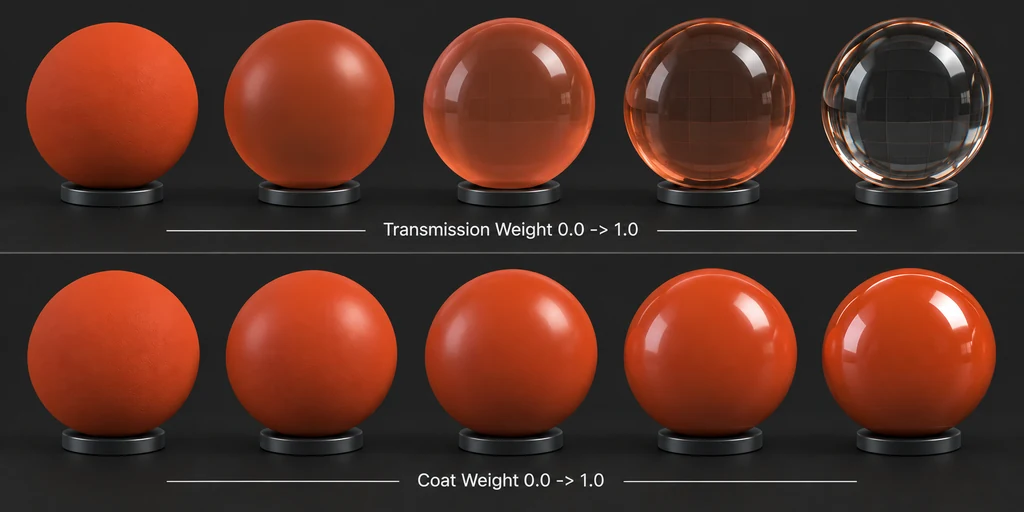
Transmission describes light passing through a surface. Use it for glass, clear plastic, translucent resin, liquid-filled containers, and similar products. The material still reflects its environment. A clear product that has no useful reflections usually has a lighting or roughness problem, not a missing transmission value.
Transmission works best when the mesh represents the product's real volume. A glass bottle needs inner and outer walls or an intentional approximation of them. If the model has no thickness, the result may not match the real object at edges, overlaps, or refraction paths.
Blender's Principled BSDF documentation distinguishes transmission behavior and volume-related inputs. Use the relevant controls only after you know whether the object is a solid volume or a thin sheet.
Use Coat for a separate glossy layer
Coat adds a second reflective layer above the base material. Use it when the product has a distinct top layer, such as clear-coated automotive paint, lacquered wood, coated packaging, varnished print, or polished resin over a pigmented base.
Coat is not a substitute for lowering base roughness. If the product is bare metal or uncoated molded plastic, a coat layer can produce double highlights that the reference does not contain. Match the base material first. Then add coat only when the surface has a visibly separate glossy response.
Use Coat Roughness to control the spread of the top-layer reflection. A glossy clear coat has tighter highlights than a satin protective finish. Keep the coat value modest when the reference shows only a light finish, because a strong coat can overwhelm the base material.
Use Sheen for cloth-like grazing reflections
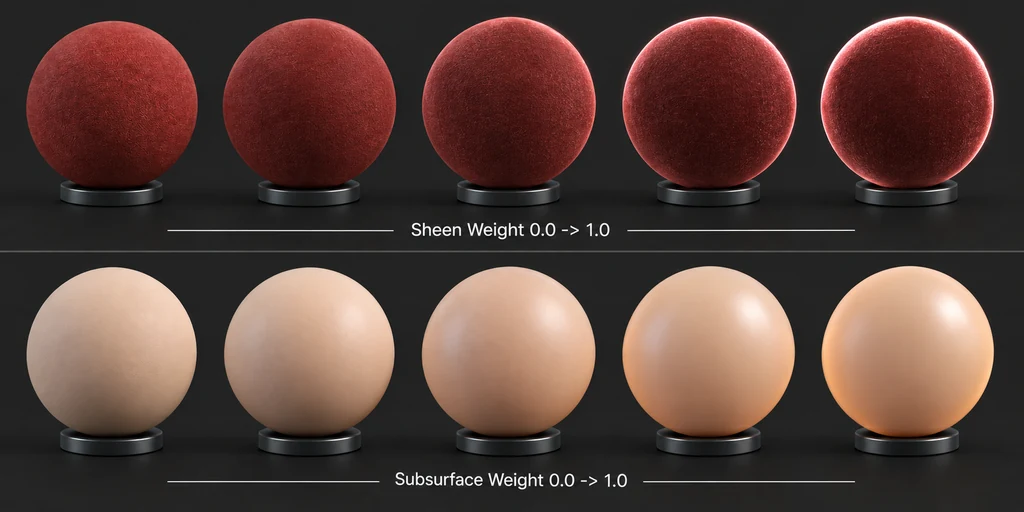
Sheen models soft reflection that appears near grazing angles on fibrous surfaces. It fits textiles, velvet-like upholstery, felt, and some soft technical fabrics. It does not fit most hard-surface products.
If a fabric looks like plastic, first inspect Base Color, roughness variation, normal detail, and the lighting angle. Add sheen when the reference shows the characteristic soft edge response that remains after those controls are correct. For a leather chair, compare the actual grazing-angle response before choosing sheen. Leather treatments vary, so establish the base roughness and normal detail before adding another lobe.
Use Subsurface for light transport inside a material
Subsurface scattering represents light that enters a material, scatters below the surface, and exits nearby. It can help with wax, skin, some food, jade, translucent plastic, and resin. For opaque painted metal, powder coating, and most hard plastics, it is usually unnecessary.
Subsurface is sensitive to model scale. A scattering distance that looks right on a small sample can look wrong on a full product. Apply the correct scene scale before judging the result. Then compare thin edges, backlit areas, and thicker sections with the reference.
Do not add subsurface to brighten a dark render. Adjust the lights, exposure, or Base Color first. Subsurface affects material transport, while a dark render often comes from the scene setup.
Choose Thin Wall based on physical thickness
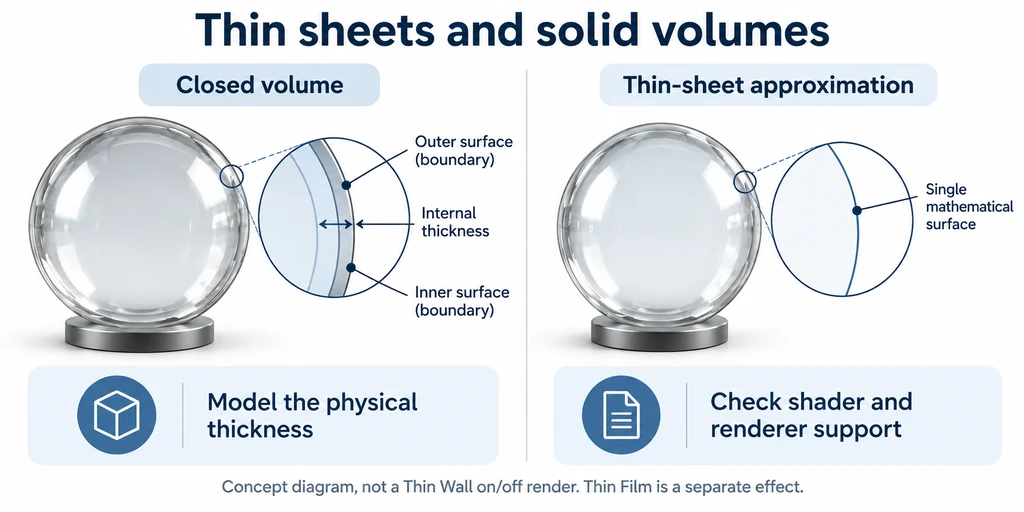
Where the selected Blender version and shader expose a thin-wall control, check its documented transmission and volume behavior. A thin-sheet approximation and a closed volume require different geometry and material decisions. It is useful when the mesh represents a thin sheet rather than a closed solid. Examples include a soap-bubble film, a thin plastic wrapper, or a single-surface window approximation.
Do not use a thin-sheet approximation for a model whose visible thickness and refraction are important, such as a glass bottle, lens, solid resin part, or molded clear housing. In those cases, model the thickness and test the result with the intended renderer. The geometry tells the shader how much material the light passes through.
Troubleshoot in a controlled order
When a material does not match the reference, use this order:
Confirm the surface category: dielectric, metal, coated dielectric, fabric, clear volume, or scattering material.
Confirm scene scale and mesh thickness.
Match Base Color, Metallic, and Roughness under neutral lighting.
Add one effect: Transmission, Coat, Sheen, or Subsurface.
Check whether the effect improves the reference match at multiple angles.
Test the exported asset in the target renderer before approving it for delivery.
This sequence keeps an artist from hiding an incorrect base material behind layered controls. It also identifies portability risks early. A renderer or delivery format may not support every Principled BSDF effect in the same way. For glTF delivery, validate supported material features and extensions with the target viewer and the glTF specification. Khronos glTF specification