Separate the general capabilities of USD from the narrower material path implemented by the exporter and receiving application. This article concerns a tested delivery route, not a promise that every USD renderer behaves like mobile AR.
Map the actual material features
Inventory the source material's color, roughness, metalness, normal detail, transparency, and any extensions it uses. Consult the glTF material specification for the source definitions.
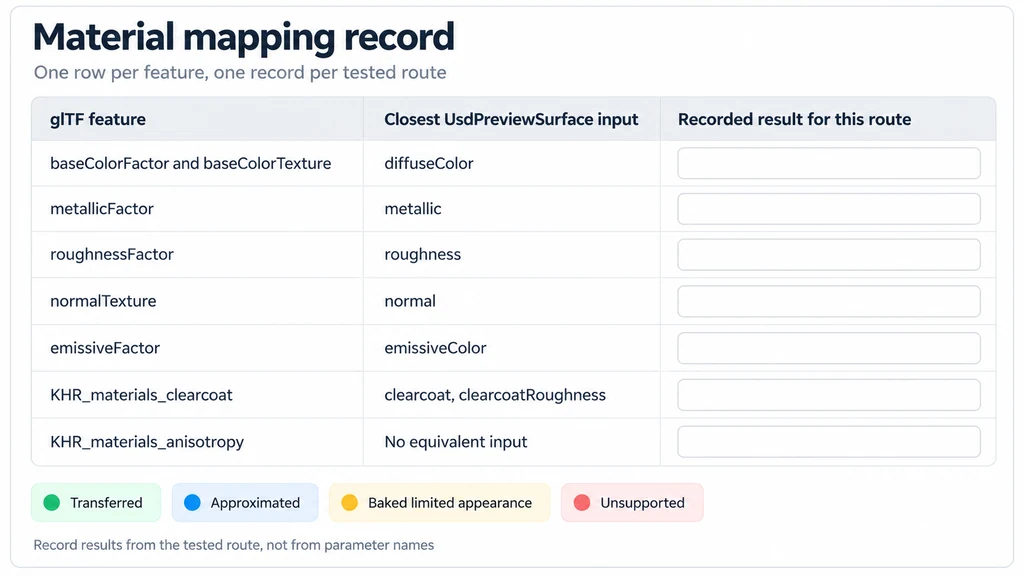
Identify the destination representation. UsdPreviewSurface provides a specific interchange model, not a one-to-one implementation of every possible glTF extension or authoring shader.
For each feature, record whether the route transfers it, approximates it, bakes a limited appearance, or leaves it unsupported. Keep that record separate from subjective comments about which preview looks better.
Choose a representative comparison
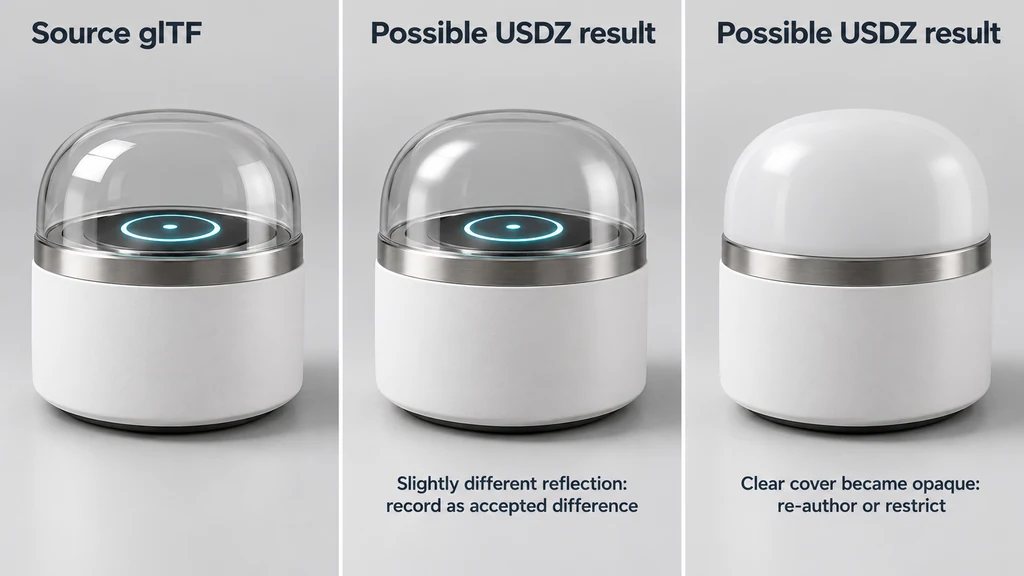
Use product regions that reveal the important differences. A painted panel, clear cover, and directional metal component test different material behavior.

Keep source revision, texture files, and export settings fixed. Compare under controlled conditions where possible, while acknowledging that the destination may use a different environment and rendering system.
Do not use different lighting to compensate for an incorrect map assignment. Resolve structural material errors before judging unavoidable renderer differences.
Compare the delivered file in the destination
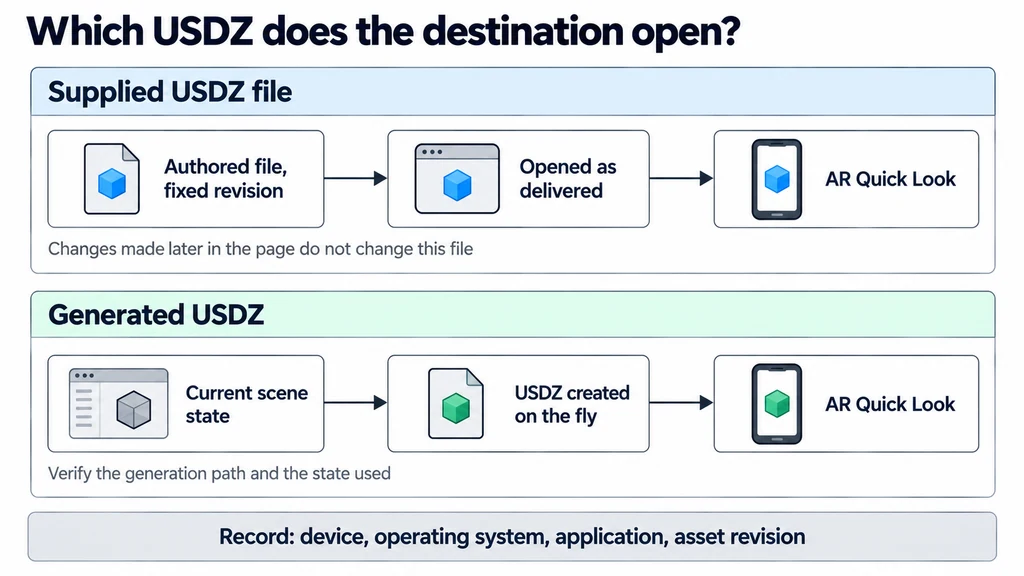
Open the exact USDZ intended for release. If the application generates it dynamically, verify the generation path and the state used to create it. The model-viewer scene-graph examples describe relevant differences between supplied and generated AR assets.
Inspect labels, transparent boundaries, dark and bright finishes, and fine normal detail. Check both the default view and another angle that exposes the surface response.
Record the device, operating system, application, and asset revision. A desktop preview of a USD scene is useful but does not replace this destination test.
Keep a feature-level translation record
| Source feature | Destination question |
|---|---|
| Metallic-roughness surface | Are the correct image channels and scalar factors assigned? |
| Normal detail | Is orientation and tangent-space interpretation correct? |
| Alpha coverage | Does the intended cutout or transparency survive? |
| Transmission or volume | What supported representation or reviewed approximation is exported? |
| Directional metal or layered finish | Does the chosen exporter and receiver implement that feature? |
| Compressed texture | Can the conversion path decode and rewrite it in an accepted image format? |
USD is broader than UsdPreviewSurface, and a particular Quick Look route is narrower than the full USD ecosystem. Avoid presenting a limitation in one exporter as a limitation of every USD renderer.
A supplied, manually reviewed USDZ makes the release state explicit. A generated file can be useful for dynamic changes, but its supported feature set needs its own fixture tests. Preserve an exporter-version record and compare the actual generated or supplied bytes, not a different desktop source scene.
Approve differences by product meaning
Decide whether a difference changes the finish category, hides important information, or creates a false impression of construction. A slightly different reflection is not the same issue as a clear cover becoming opaque.
Re-author the destination material when an automated translation is inadequate. If a critical finish cannot be represented acceptably, provide an approved alternative or restrict the destination rather than silently releasing it.
Deliver the mapping record and accepted limitations with the asset. Keep the original material source so a later exporter improvement can be evaluated without reconstructing the finish. Approval should identify what the product owner accepted in the target experience, not claim universal parity between glTF and USDZ.