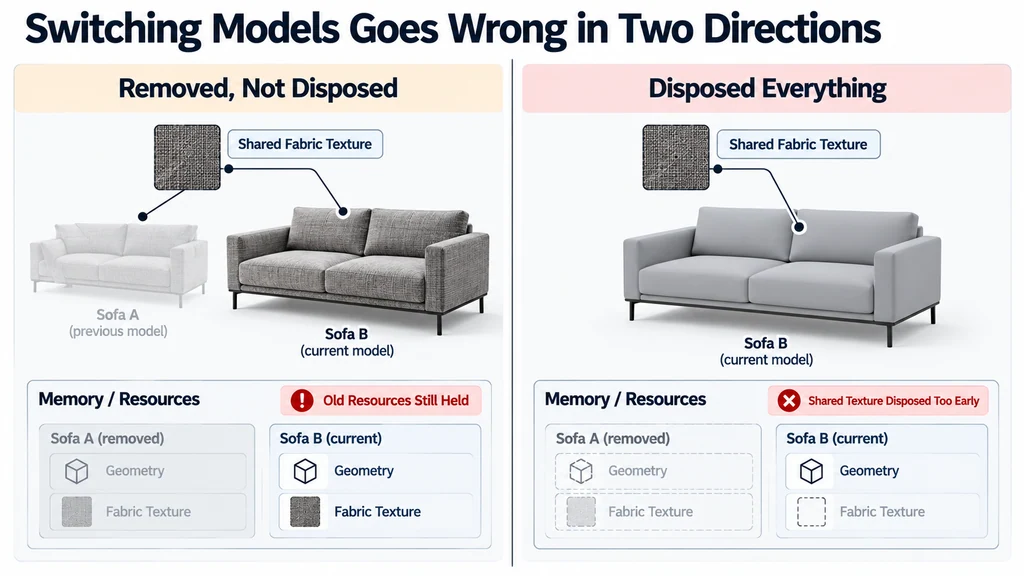
Define which resources belong exclusively to one loaded product and which belong to the application or a shared cache.
Define ownership before writing cleanup
Maintain an asset record containing its scene root and the resources it owns. Keep shared environment data and intentionally reused materials outside that exclusive ownership list.
Three.js explains disposal responsibilities, including the distinction between geometry, materials, textures, and other resources. Use those APIs according to actual lifetime.
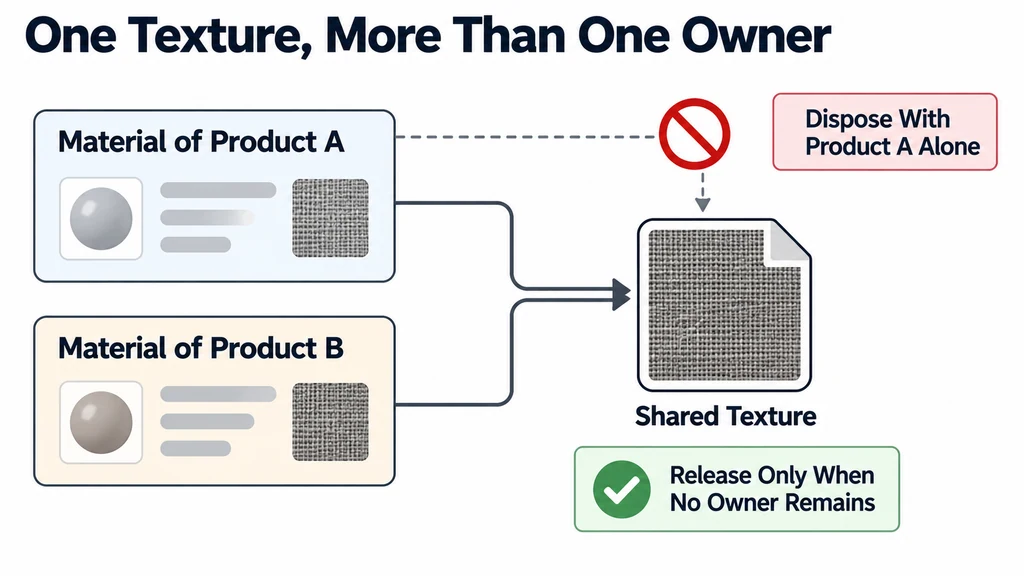
Do not assume that one material owns its texture exclusively. If several products share an image or texture object, release it only when the relevant owners no longer need it.
Handle late loads deliberately
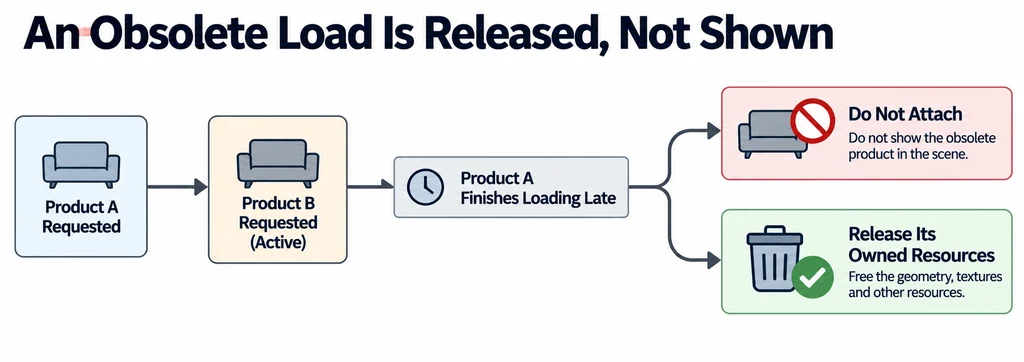
A user can select product B before product A finishes loading. Associate each request with an identity and check that identity before attaching the result.
If an obsolete request completes, release its exclusively owned resources rather than adding it to the scene. Keep the active product state independent from callback arrival order.
Decide what happens during replacement. Keeping A visible while B loads may improve continuity, but it also creates a temporary period with both resource sets resident. Include that peak in testing.
Reject stale completions before attaching them
A request counter prevents a slow response from replacing a more recent selection. The following integration pattern assumes that loadOwnedAsset returns an asset record and releaseOwnedAsset implements the ownership rules described above:
let requestId = 0;
let currentAsset = null;

async function selectProduct(url) {
  const id = ++requestId;
  let next;
  try {
    next = await loadOwnedAsset(url);
  } catch (error) {
    if (id === requestId) showLoadError(error);
    return;
  }
  if (id !== requestId) {
    releaseOwnedAsset(next);
    return;
  }
  const previous = currentAsset;
  currentAsset = next;
  scene.add(next.root);
  if (previous) releaseOwnedAsset(previous);
}
This is application pseudocode, not a complete loader. The load function must clean up partial allocations on failure. Invalidate pending requests when the viewer unmounts. A request counter ignores a stale result; it does not cancel its network transfer. Use cancellation only where the actual loader API supports it.
Observe renderer.info.memory.geometries, renderer.info.memory.textures, and renderer.info.programs over repeated cycles. These are diagnostic counts, not total GPU memory in bytes. If an asset exclusively owns ImageBitmap data, close it after its final user releases it. Do not close a bitmap shared by another live texture.
Release the old asset in an ordered step
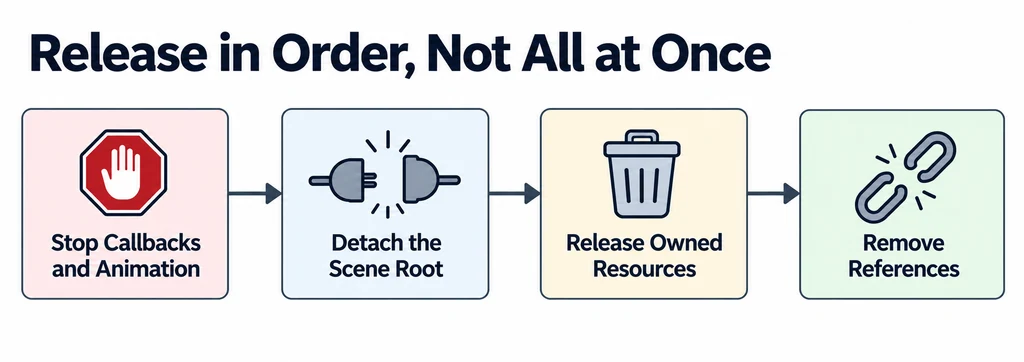
Stop application callbacks, interactions, and animation updates associated with the old asset. For animated content, use the relevant AnimationMixer lifecycle operations when the mixer or its cached actions are no longer needed.
Detach the scene root, release exclusively owned resources, and remove application references. Include event listeners and temporary object URLs in the appropriate cleanup path.
Keep error handling in the same lifecycle. A failed replacement should not leave a half-owned asset or a callback that can later reactivate the wrong model.
Test repeated cycles rather than a single unload
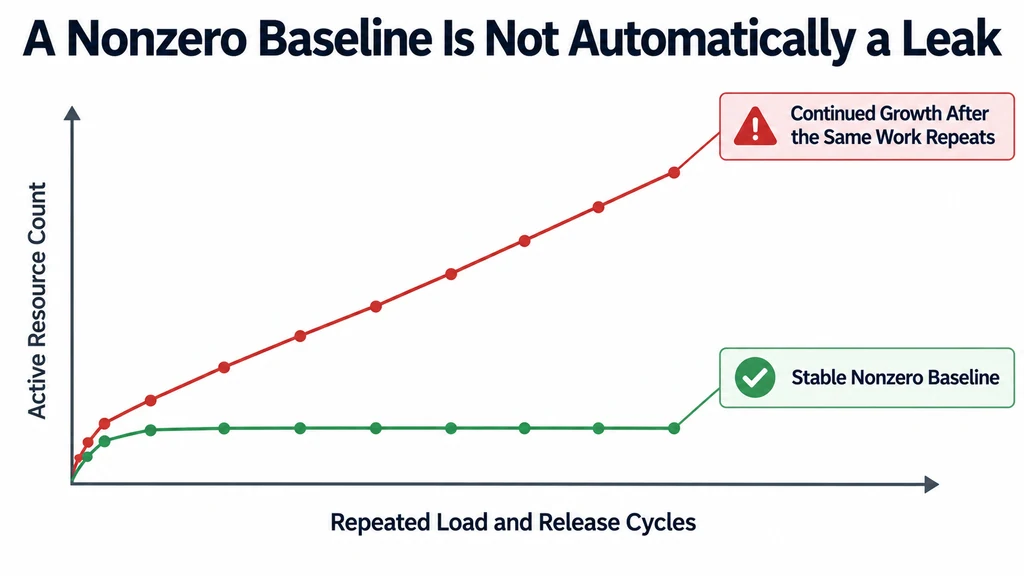
Run a fixed sequence that repeatedly loads and replaces the same products. Observe renderer counts using WebGLRenderer diagnostics, along with browser tools suited to the investigation.
A stable nonzero baseline is not automatically a leak. The renderer may retain reusable internal resources. Look for unexplained continued growth after the same work repeats.
Verify behavior as well as counters. The new model must retain its textures, controls, and animation after the old one is released. Test rapid switching, failed loads, and returning to an earlier product.
Document the expected ownership and baseline. Avoid claiming complete memory recovery from a single JavaScript heap snapshot or a zero visible-object count. A reliable replacement path has a repeatable lifecycle and no abandoned work whose owner is unclear.