Separate asset validity from visual approval
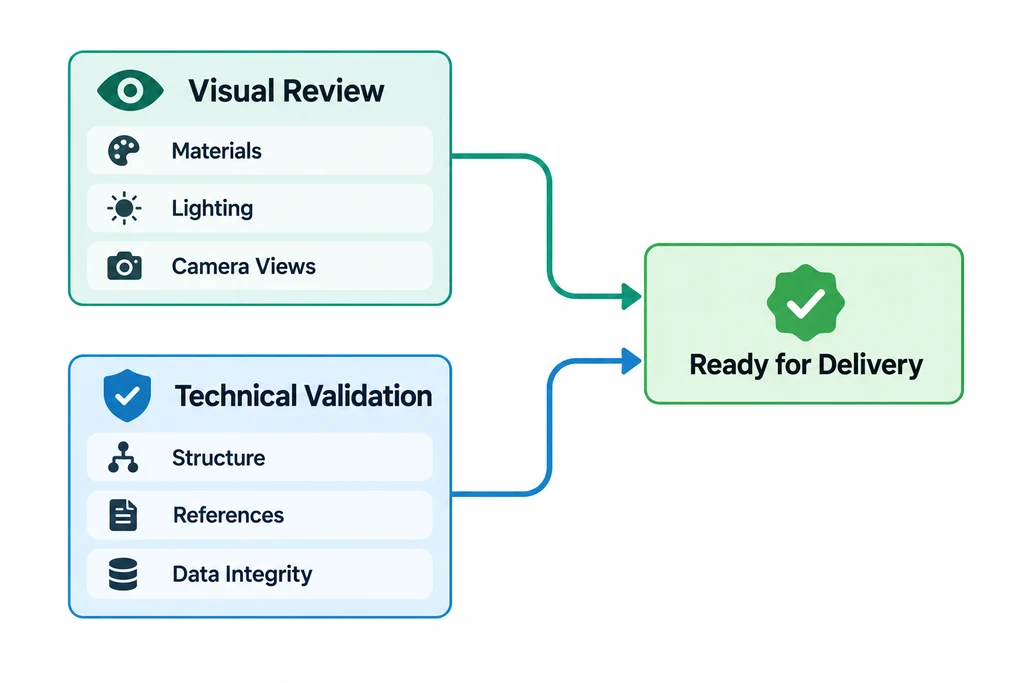
Product assets need two different checks. A visual check asks whether the model, materials, lighting, and camera views match the approved product. A technical validation check asks whether the glTF or GLB follows the format rules and contains data that a runtime can interpret safely.
The official Khronos glTF Validator validates assets against the glTF 2.0 specification and extensions. It produces a JSON report with detected issues and asset statistics. Khronos glTF Validator
The validator does not replace visual review. It can report structural problems in a model that looks correct in one viewer. It also cannot prove that a material matches a product sample, that an animation feels right, or that a target phone maintains an acceptable frame time. Treat it as a QA gate before those checks.
Run the validator before delivery
Use the official browser tool for a manual check, or use the validator package in a build process when a team exports many variants. The Khronos project provides both the hosted drag-and-drop tool and packages for integration.
Validate the final exported file, not the source model. Exporters can change texture references, coordinate data, material properties, animation samplers, and extensions. If a product has several colorways or configuration states, validate each final GLB that the application will deliver.
Read errors, warnings, and statistics
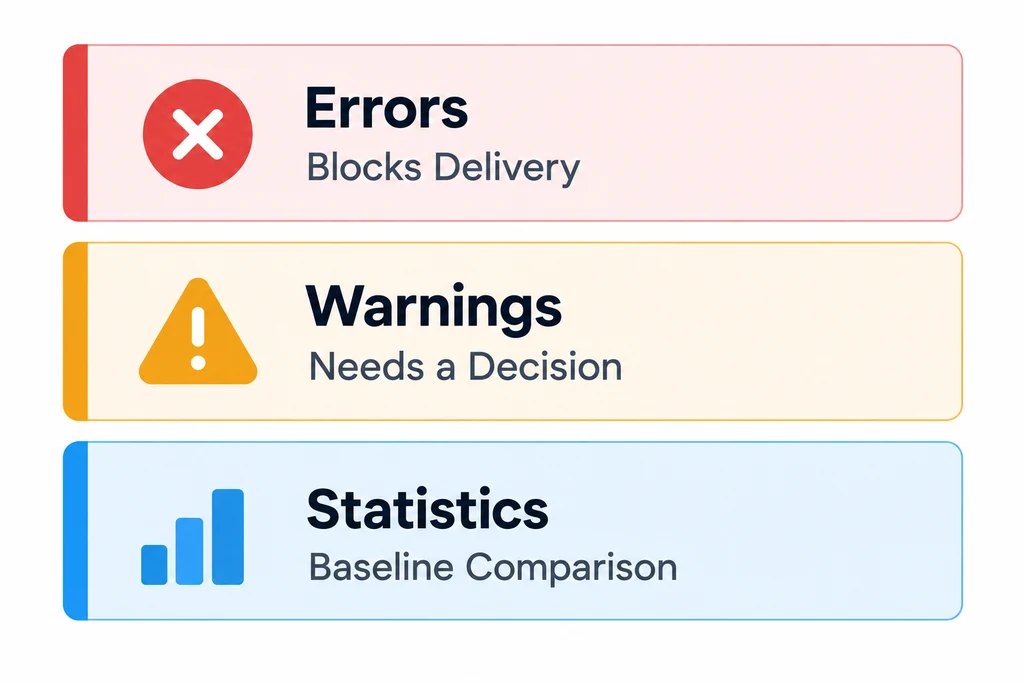
Start with errors. An error can indicate invalid file structure, invalid internal references, malformed data URIs, or invalid accessor data. The validator documents checks for JSON syntax, GLB v2 correctness, property types, internal references, binary buffers, and accessors.
Then read warnings in context. A warning does not always prevent rendering, but it can expose a portability risk. For example, the validator can warn about non-power-of-two image dimensions and unsupported image features. That does not mean every warning blocks delivery. It means the team needs a decision based on the target viewer, renderer, and device scope.
Use asset statistics as a review aid, not as a performance score. Counts for meshes, materials, textures, accessors, and animations help the team compare a new export with an approved baseline. A sudden increase in texture count or buffer size is a reason to inspect the source change.
Check materials, textures, buffers, and animation
For materials, check the extensions used by the asset. A file may validate correctly and still require a viewer that supports its material extensions. The validator lists support for several material extensions, including clearcoat, transmission, volume, sheen, anisotropy, IOR, and material variants.
For textures, inspect image dimensions, file references, and color-space assumptions in the authoring process. The validator can catch some image-level issues, but it cannot determine whether a roughness map was authored with the intended value interpretation. Maintain a material checklist alongside validation.
For geometry, pay attention to accessors, buffer views, and node transforms. Invalid quaternions, matrices that cannot be decomposed, and incorrect bounds can cause a model to behave differently between runtimes. The validator documents checks for these cases.
For animation, validate every clip that the product experience exposes. The validator checks animation inputs and outputs, but playback still needs testing in the target viewer. A valid animation can be poorly timed, attached to the wrong interaction, or too expensive for the target device.
Keep a minimal automated check bounded
The following Node.js fragment reads one self-contained GLB and prints the validator's issues. Install and pin the official gltf-validator package before using it.
const fs = require('node:fs/promises');
const validator = require('gltf-validator');

async function main() {
  const bytes = await fs.readFile('product.glb');
  const report = await validator.validateBytes(
    new Uint8Array(bytes),
    { uri: 'product.glb' }
  );
  console.log(JSON.stringify(report.issues, null, 2));
  if (report.issues.numErrors > 0) process.exitCode = 1;
}
main().catch((error) => {
  console.error(error);
  process.exitCode = 1;
});
This fragment does not supply an external-resource resolver or a batch summary. Use a complete package-aware procedure for glTF files with sidecar resources.
For a known diagnostic example, GLB_INVALID_VERSION identifies an invalid container version. MESH_PRIMITIVE_GENERATED_TANGENT_SPACE warns that the renderer may need to generate tangent-space data. Read the exact issue message, severity, and pointer or byte offset in the report; do not classify every message as the same kind of failure. An unsupported-extension notice can also limit what that validator version has checked.
Add validation to a production handoff
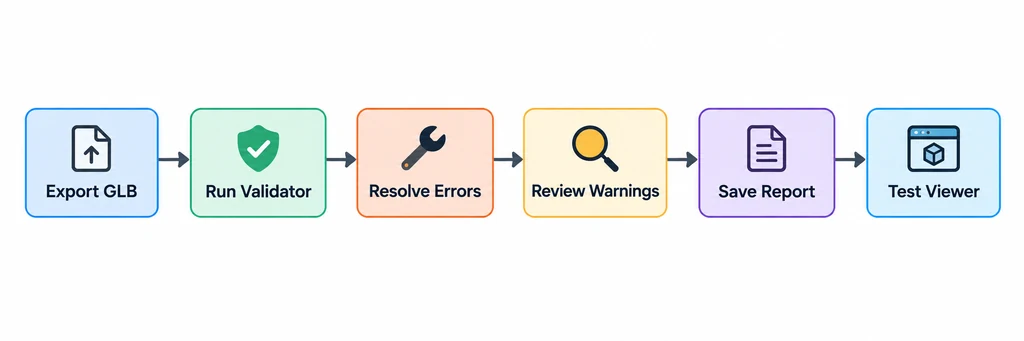
Use a small handoff checklist:
Export the final GLB or glTF package.
Run the official glTF Validator.
Resolve errors.
Review warnings against the target runtime and delivery scope.
Save the report with the asset version.
Open the file in the target viewer and complete a visual and interaction check.
For a product catalog, record the validator result next to the asset identifier and export date. This gives the team a technical baseline when a later update changes a mesh, material, texture, or extension.
Test the actual target viewer
glTF is designed for efficient transmission and loading of 3D scenes and models, but the final behavior depends on the engine or application that consumes the asset. Khronos glTF overview
After validation, test the product asset where customers will use it. Confirm loading behavior, camera framing, material appearance, animation triggers, and any AR handoff. Validate again after changes to the exporter, material stack, texture pipeline, or glTF extensions.