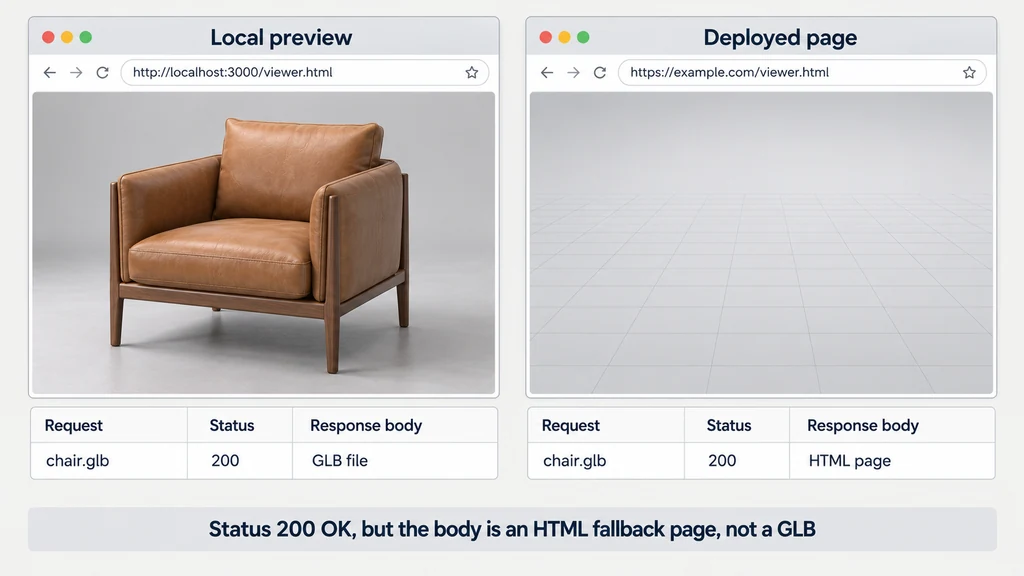
Reproduce the failure on the actual page and capture the browser's network and console information.
Check the response, not only its status
Open the exact requested URL from the network record. Confirm that it returns the intended asset bytes. A successful HTTP status can still contain an HTML fallback page instead of a GLB.
Check capitalization, base paths, redirects, and the deployment directory. A path tolerated by a local environment may not identify the same file on the host.
Compare the requested filename with the uploaded artifact. Do not rename several resources speculatively while leaving references unchanged.
Distinguish a cross-origin refusal from a missing file
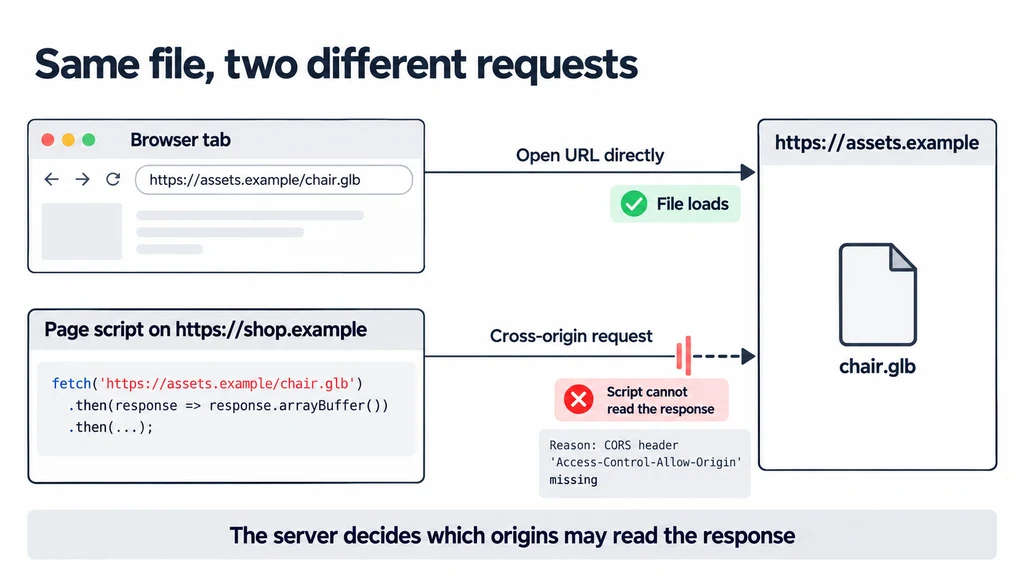
If the page and asset use different origins, inspect the browser's error and the server's response headers. CORS is a server-controlled access mechanism for browser requests.
Opening an asset URL directly in a tab does not prove that script on another origin may read it. Correct the server configuration for the intended origins and request behavior.
Do not disable browser security or recommend permissive credential handling as a production fix. Keep access policy appropriate to the asset's intended audience.
Follow dependent requests
A loader may also request textures, buffers, or decoding resources. Inspect every failed dependency rather than stopping at the first successful GLB response.
Check the configuration required by the chosen GLTFLoader path. A decoder that was available through a development server may not exist at its production URL.
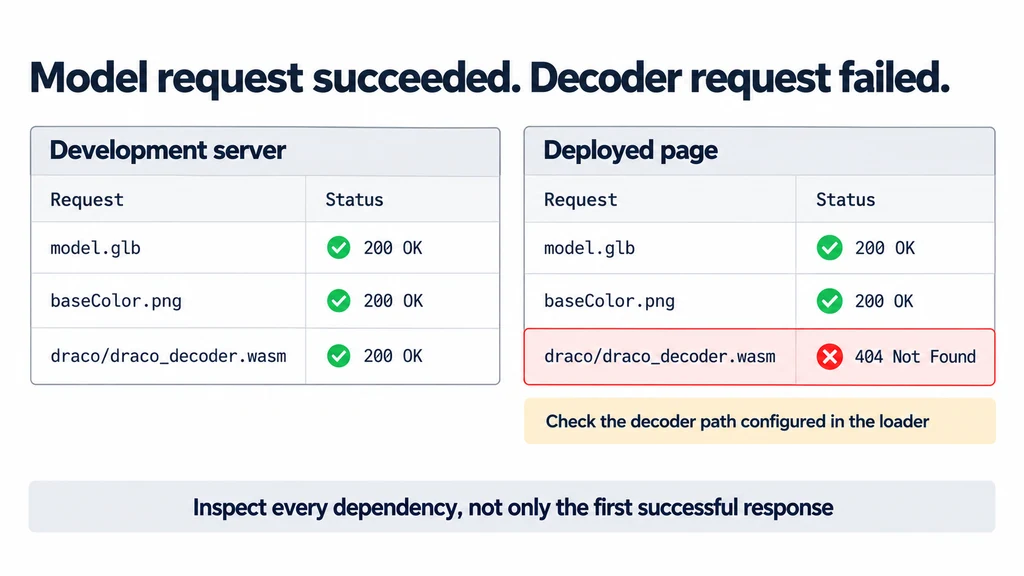
Test the same deployed page without development-only files. If the asset uses external references, confirm that their relative paths still resolve from the deployed location.
Match an error to the actual response
| Symptom | Request evidence to inspect |
|---|---|
| An unexpected '<' or HTML parse error | The asset URL may return a page fallback or login response. |
| A CORS error | Compare page origin, asset origin, and the resource's access headers. |
| Model fetched but decoding failed | Inspect decoder URLs, CSP, worker requests, and codec configuration. |
| Old model after replacement | Compare received bytes and cache behavior with the intended revision. |
Exact error strings vary by loader. Confirm the response body before assigning a cause. Serve GLB as model/gltf-binary and WebAssembly modules as application/wasm; the correct MIME type does not repair an incorrect body.
For Three.js, configure the relevant Draco decoder path, KTX2Loader, or Meshopt decoder through the APIs used by the pinned GLTFLoader version. Self-hosting the required files can make deployment ownership clearer, but those files still need correct URLs, access policy, and version compatibility. Retest the complete page rather than only the primary model request.
Verify the file revision actually received
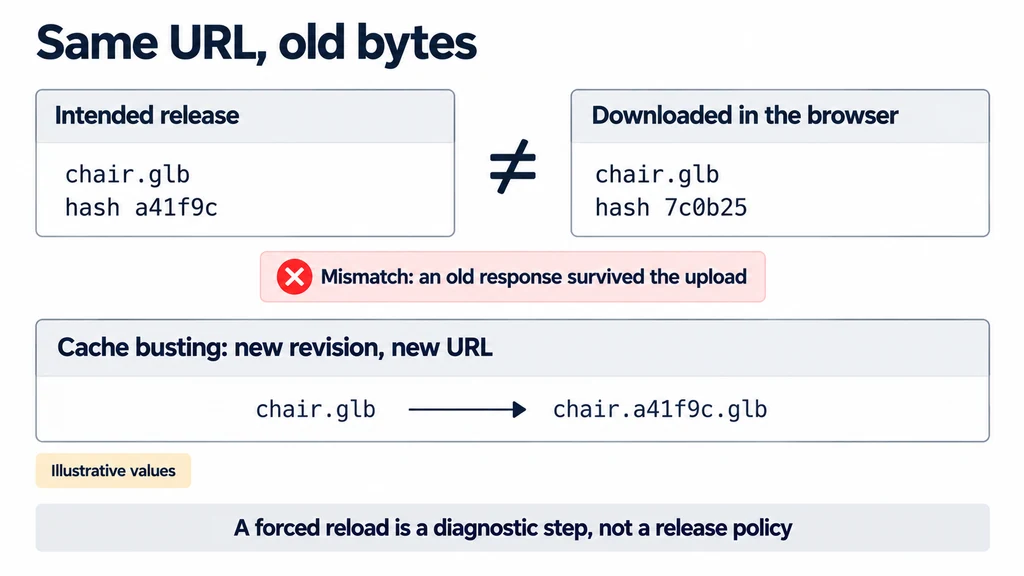
Compare an identifier or hash of the downloaded resource with the intended release. Review the HTTP caching behavior when an old response survives a new upload.
A forced reload is a diagnostic step, not a complete release policy. Establish how new asset revisions receive distinct URLs or appropriate validation behavior.
Repeat the test in the intended browser and in a clean session. Verify both success and the user-facing failure state.
Keep a short incident record containing the failing request, the incorrect response or policy, and the correction. Close the issue only when the deployed page loads the intended asset and its dependencies. A local preview remains useful evidence about the file, but it does not test the production delivery path.