Preserve the original GLB. Work on a copy and keep extracted resources outside any delivery folder until their meaning has been reviewed.
Inspect the package before extraction
List the materials, images, and texture references with an inspection tool. glTF Transform provides inspection and format-conversion utilities that can help expose resources.
Check whether the asset uses image-format extensions or external dependencies. Choose a tool that understands those resources. A failed image preview does not prove that the embedded resource is empty.
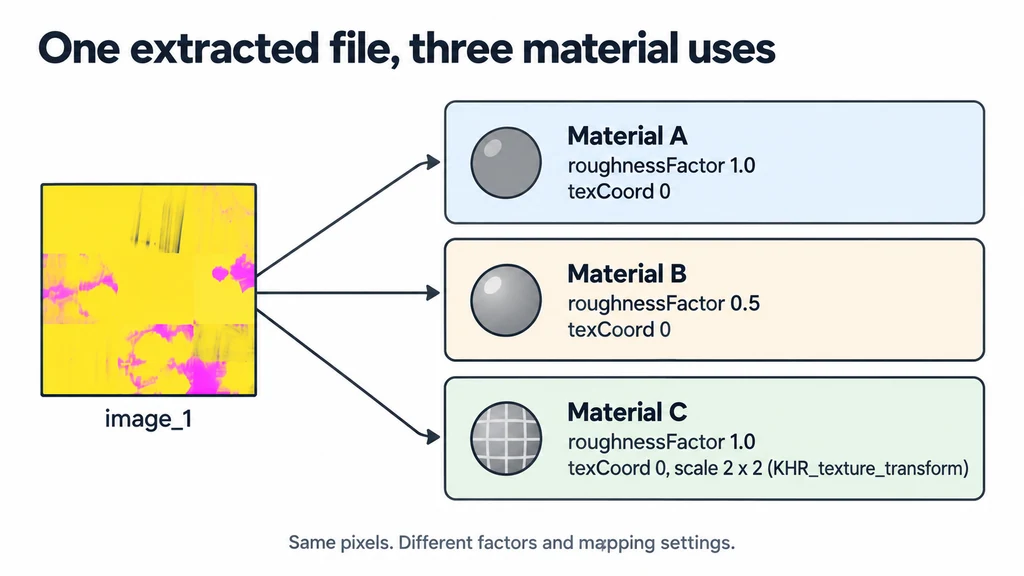
Record which materials share an image. One extracted file may participate in several material uses with different factors or mapping settings.
Extract a copy into a separate working directory
Use the selected tool's documented command for the installed version. Preserve the generated scene description alongside the image files rather than keeping only the images.
Check that every expected resource exists and can be decoded by the tools intended for editing it. Keep the extraction log when the tool reports conversion or unsupported data.
Do not overwrite a source texture library with generated names from the GLB. Names inside delivery assets are not a reliable namespace for a larger production project.
Trace each image to its material role
Follow material texture references rather than guessing from appearance. The glTF material definition specifies the relevant slots and channel conventions.
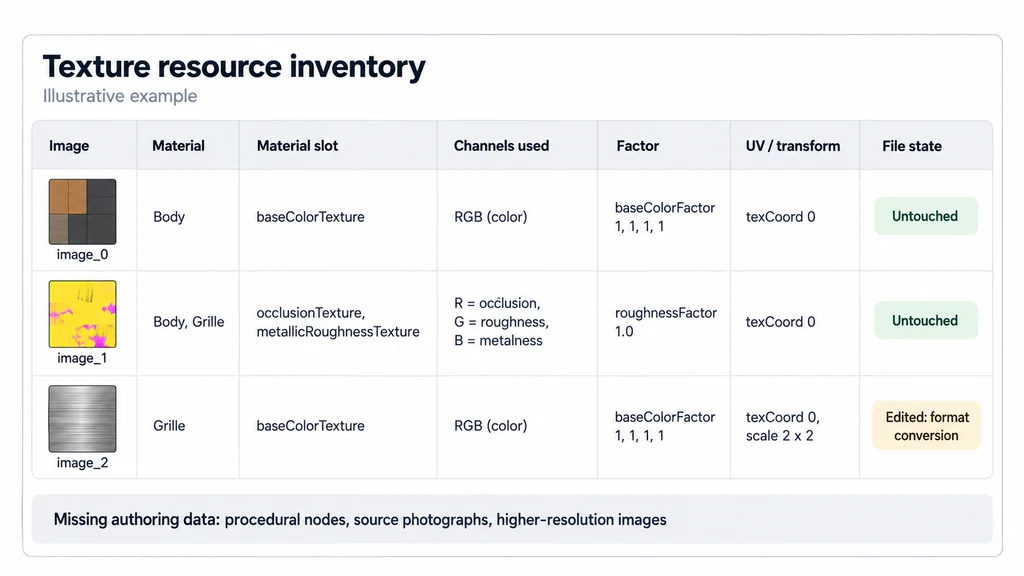
Record the image, the material, its purpose, and any scalar or color factor that contributes to the result. Include the UV set and texture transform when used. A visible color can depend on both the image and the material factor.
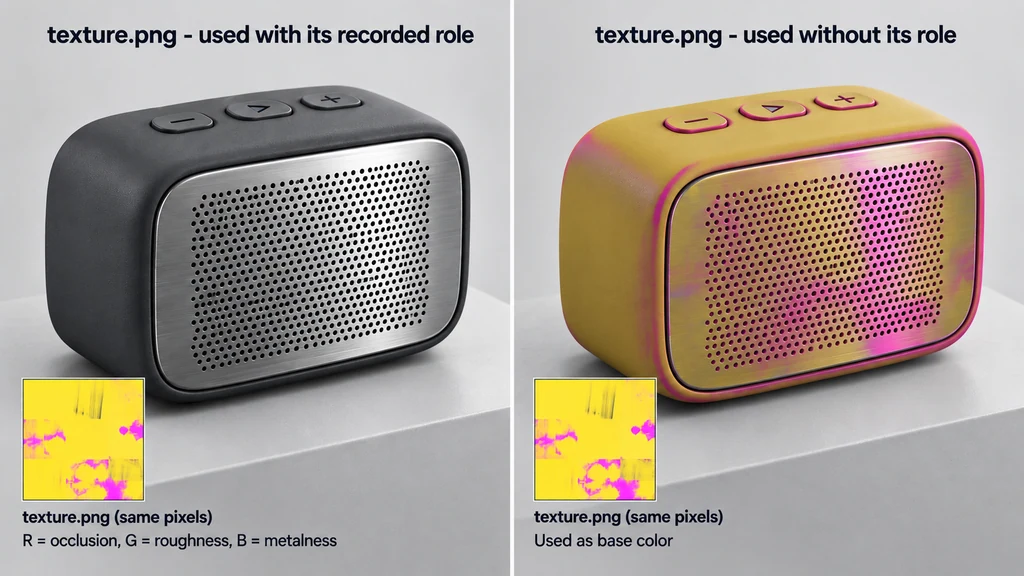
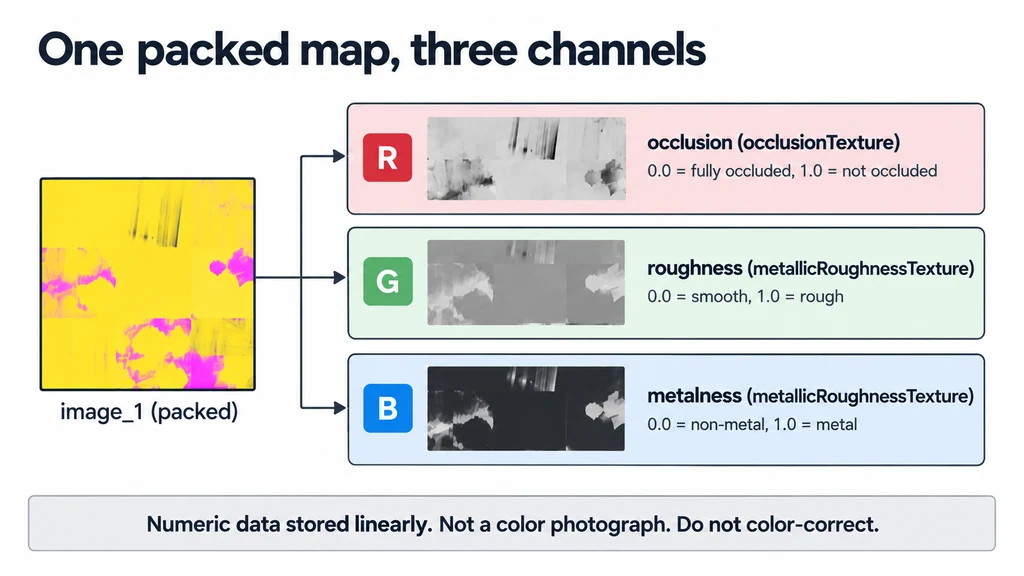
For packed surface data, identify each used channel. A mostly green or yellow-looking image may be valid numeric data, not a damaged color photograph. Do not apply photographic color correction to it.
Read channels and factors before editing
| glTF material use | Image interpretation | Additional values to retain |
|---|---|---|
| baseColorTexture | RGB color in sRGB; alpha is linear coverage data. | baseColorFactor and alpha settings. |
| metallicRoughnessTexture | G is roughness, B is metalness; these are linear data. | roughnessFactor and metallicFactor. |
| occlusionTexture | R supplies occlusion. | strength, UV set, and any texture transform. |
| normalTexture | Tangent-space direction data. | scale and the relevant UV/tangent setup. |
| emissiveTexture | RGB color in sRGB. | emissiveFactor and supported emissive extensions. |
An ORM image conventionally places occlusion in R, roughness in G, and metalness in B, but follow the actual material references. Occlusion and metallic-roughness can refer to different images or use different mapping.
For an installed glTF Transform CLI, the documented inspection and copy operations can expose an asset as separate resources:
gltf-transform inspect model.glb
gltf-transform copy model.glb unpacked/model.gltf
Use a new output directory and check the installed version's help. Preserve the resulting JSON; extracting pixels without the texture, material, sampler, and UV relationships loses the information needed to rebuild the appearance. An image-format conversion may also require a tool that supports the asset's extensions.
Rebuild only the material you can support
Create a small test material with the extracted maps and recorded settings. Compare it with the original GLB under controlled conditions. Differences can come from the receiving renderer as well as missing information, so investigate rather than compensating at random.
Remember that extraction cannot restore procedural nodes, source photographs, or higher-resolution images that were never included. Describe those as missing authoring data.
Deliver a resource inventory with the extracted set. Keep untouched images separate from edited versions and record any channel unpacking or format conversion. The result should let another artist explain how each file contributes to the product, not leave them with a folder of anonymous textures.