A product configurator needs to keep three things aligned: the product the customer can order, the model the viewer renders, and the resources the device can handle. Plan those responsibilities together before turning a CAD assembly into a storefront feature.
Define what the customer needs to inspect
Choose a concrete task, such as checking the rear ports, comparing two finishes, or opening a lid. Keep photographs, dimensions, and product descriptions available alongside the viewer. An interactive model supplies another way to inspect the product; it does not establish physical accuracy or a commercial benefit by itself.
List the valid configurations before building the finish controls. Eight colors, four finishes, and three materials create 96 combinations only if every combination is permitted. Pricing, availability, and order validity belong to authoritative commerce data.
Prepare a delivery asset from the approved source
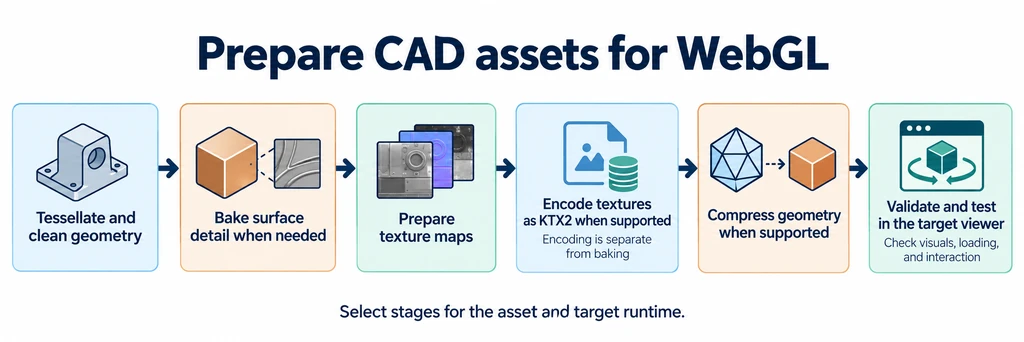
Keep the source assembly and create a delivery copy. Preserve the component boundaries needed for selection, animation, and configuration. Simplify hidden manufacturing detail only when it is irrelevant to the approved views and interactions.
Tessellate curves, inspect silhouettes, and verify dimensions before compression. Geometry reduction changes the mesh; quantization changes numeric precision; codec compression changes how prepared data is stored. Record each stage so a later defect can be traced to the operation that introduced it.
Use a budget worksheet rather than a universal triangle target:
| Resource | Record | Review condition |
|---|---|---|
| Geometry | Triangles, vertices, attributes, and required part boundaries. | Closest view and all moving states. |
| Draw submissions | Calls under the actual render passes. | Selected finishes, shadows, and overlays enabled. |
| Textures | Dimensions, roles, mip levels, and runtime formats. | Label detail and peak resident resource use. |
| Transfer | Hosted bytes and dependency requests. | Named cold and warm conditions. |
| Interaction | Loading outcomes and responsive controls. | Representative devices and the actual page. |
Lower counts are useful when the product still meets its requirements. One mesh with several material groups is not necessarily one draw call. A small download can still decode into large textures.
Configure the loader and material pipeline deliberately
The receiving loader must support the asset's required extensions and have its decoder or transcoder dependencies configured. The GLTFLoader documentation describes the relevant setup for Three.js. Pin the renderer and its companion dependencies together.
Use KTX2 where the chosen runtime can transcode it into an appropriate GPU format. Measure transfer, transcoding, and runtime resource use separately. Keep the texture's role clear: base color and emissive images carry color, while normal, roughness, metallic, and occlusion maps carry material data.
Establish a reference lighting environment, output color space, exposure, and tone mapper. These are review settings, not guarantees of photorealism. A cinematic transform and a neutral product transform can produce different appearances. Compare the same finish under the approved setup before changing the texture to compensate.
For environment processing, track the resulting render target and release it when its final owner no longer needs it. Removing the source HDR image does not by itself release every resource created from it.
Keep configuration state separate from material objects
Use a stable configuration record for the selected SKU, finish, accessories, and asset revision. Resolve that record into material assignments and visible components. Avoid reconstructing the order from a mesh color or a display label.
Reusing materials and textures can reduce allocation churn, but shared resources require ownership rules. A material edit can affect every mesh using the same object. Clone only when an independent change is intended, and release exclusive resources when their lifetime ends.
Changing an ordinary numeric uniform does not normally require rebuilding the shader. Changes to a material's feature set can require an update. Follow the pinned material API rather than setting needsUpdate after every click or promising that a preset library eliminates garbage-collection pauses.
Handle rapid selection changes with an attempt identity. A late texture load for an old finish must not replace the current selection. Keep the current product visible or show a matching poster according to the chosen loading policy.
Treat mobile AR as another delivery route
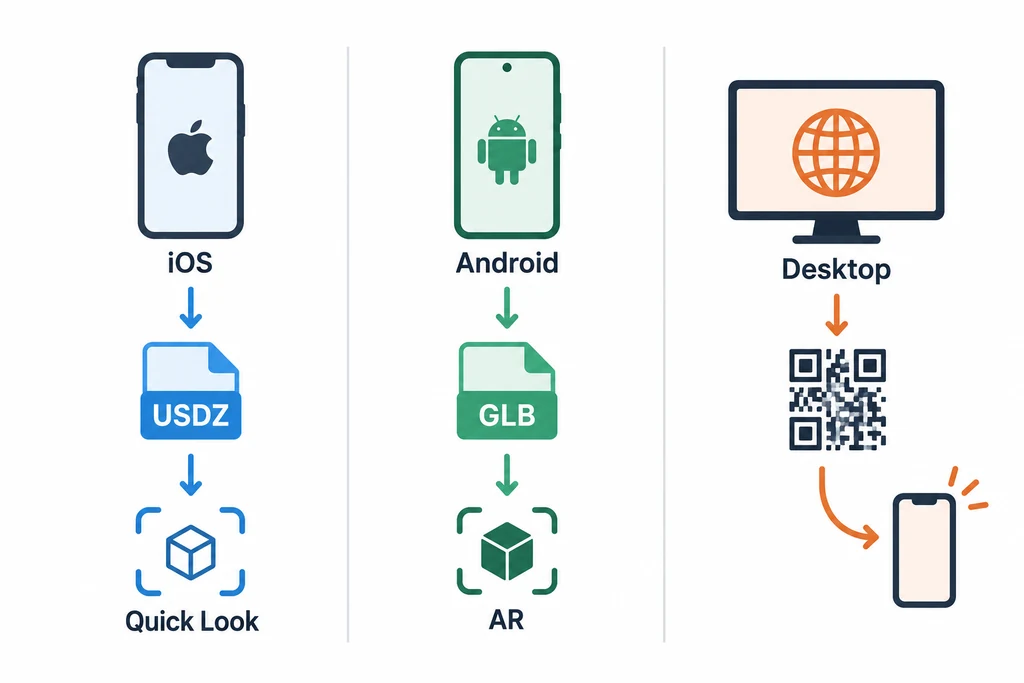
A page can launch supported Apple devices into Quick Look with an appropriate USDZ, or supported Android configurations into Scene Viewer with an appropriate glTF asset. A browser AR session is another implementation path. Test the actual route, format support, and fallback rather than treating these as interchangeable renderers.
Map the selected configuration to the asset the receiver actually opens. Runtime material changes in the browser do not automatically update a separately hosted AR file. Verify dimensions in the exported package, then inspect placement on representative hardware. Tracking and surface detection still affect the result.
For a desktop QR handoff, send the user to the correct product and configuration. Include an understandable alternative when the receiving device cannot use AR.
Compare media by the information it supplies
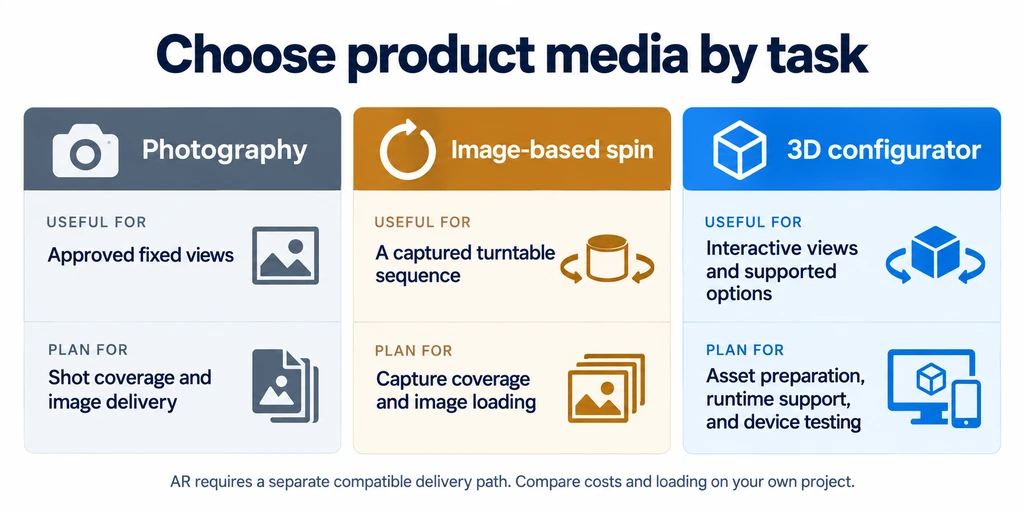
| Medium | Useful role | Additional work |
|---|---|---|
| Photography | Evidence of a physical sample under recorded conditions. | Capture, retouching, and updates to changed products. |
| Image spin | A controlled sequence of approved views. | Frame production, loading, and consistent configuration. |
| Real-time configurator | User-controlled views and supported product choices. | Asset engineering, state logic, resource management, and compatibility review. |
The diagram is a planning illustration, not measured evidence that one medium increases conversion or reduces returns. Existing photographs can remain useful across campaigns; a digital asset also needs maintenance when the product or delivery stack changes.
Release with technical and commercial evidence
Validate the final asset, review appearance and behavior in the target application, and retain the export and runtime versions. Exercise loading failure, retry, product replacement, keyboard controls, reduced motion, and any AR return path in the project's testing process.
For a commercial rollout, compare randomized eligible groups where practical. Track whether 3D was offered, not only whether a visitor chose to use it. Record loading failures, purchases, relevant return reasons, and page-performance effects. Report the observed conditions and uncertainty instead of presenting a universal conversion lift.