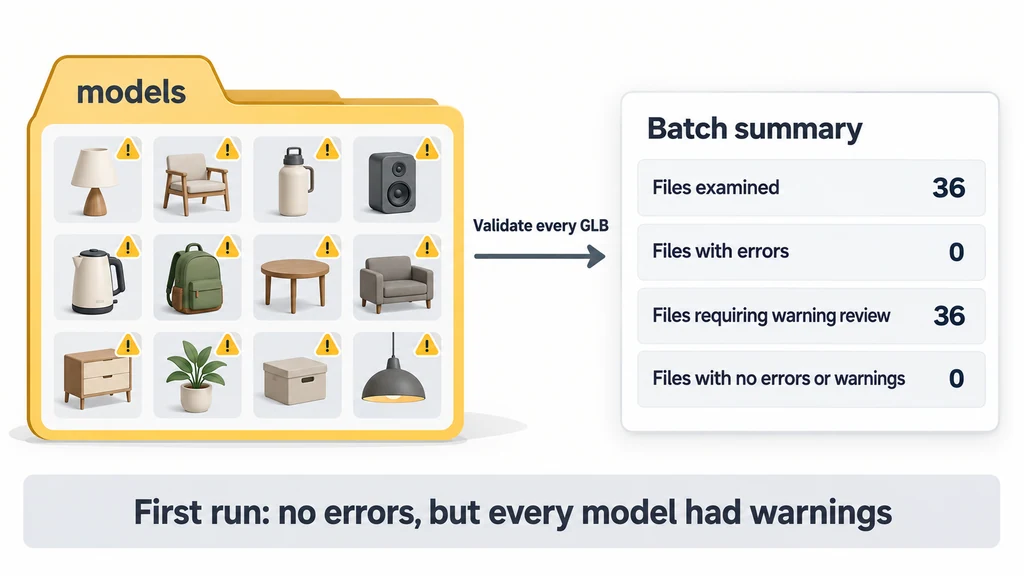
The first run found no errors, but every model had warnings. The second identified the deliberately invalid copy. The reports helped me investigate a shared export setting and confirm that the batch process preserved a known failure.
Prepare the folder and install the tool
Install the LTS version of Node.js with its Windows installer. If Node.js and npm are already installed, use that installation. Node.js runs the script; npm installs the validator package.
Create a folder named GLB-Validation-Test. In File Explorer, open that folder, press Ctrl + L, replace the address with powershell.exe, and press Enter. A separate PowerShell window should open with the test folder shown at its prompt.
Keep your models in a subfolder named models, or use an existing model folder elsewhere. The script scans subfolders too. Select a folder containing only the assets you intend to examine.
Run these commands separately:
npm.cmd init -y
npm.cmd install --save-exact [email protected]
The first command creates package.json, the test folder's project settings. The second downloads the official validator package into node_modules. Khronos provides the Node.js package instructions. This procedure does not require the source-code ZIP from GitHub.
The explicit version matches our recorded experiment. npm's installation documentation explains that --save-exact saves a specific dependency version rather than a version range. Retain package.json and package-lock.json with the test record.
During my setup, PowerShell blocked npm.ps1 under its script execution policy. Using npm.cmd allowed me to call the Windows command wrapper. We use that spelling throughout this Windows procedure.
An installation message means the package is ready. It has not checked your models. npm's vulnerability audit concerns software dependencies, rather than the contents of your GLB files.
Run the supplied script on your models
Save the accompanying validate-models.cjs beside package.json. This script calls Khronos's validator, collects the reports, and produces the summary. You do not need to write it yourself.
Run:
node validate-models.cjs
When prompted, paste the model folder's path and press Enter. If the models are in the folder where PowerShell is open, enter one dot, ".". The dot means the current working folder. Our actual runs used this option.
Alternatively, provide the folder in the command:
node validate-models.cjs "D:\Product Models\models"
Replace the example path with your own. Keep quotation marks around paths containing spaces. Type only the command, without copying the PowerShell prompt or adding a leading pipe character.
The script reads the originals and writes a new run folder under validation-reports. Its validateBytes call and externalResourceFunction callback use the API documented by Khronos. The resource loader reads dependencies inside the selected folder and does not fetch remote resources. For glTF with separate textures or buffers, select a folder containing those dependencies as well.
A file receives STRUCTURALLY_CLEAN, REVIEW_WARNINGS, ERRORS, or CHECK_FAILED. Read or invocation failures stay in the summary. Each main asset also receives a SHA-256 hash of its tested bytes. For glTF with separate resources, retain the dependencies too; the main-file hash does not identify their contents.
Read the results from our 36-model batch
On October 6, 2026, I ran the script against 36 GLB files using validator version 2.0.0-dev.3.10. The manifest listed 36 expected files, and the summary recorded 36 completed checks.
| Recorded result | First run: originals | Second run: originals plus test copy |
|---|---|---|
| Files examined | 36 | 37 |
| Files with errors | 0 | 1 |
| Files requiring warning review | 36 | 36 |
| Files with no errors or warnings | 0 | 0 |
| Failed checks | 0 | 0 |
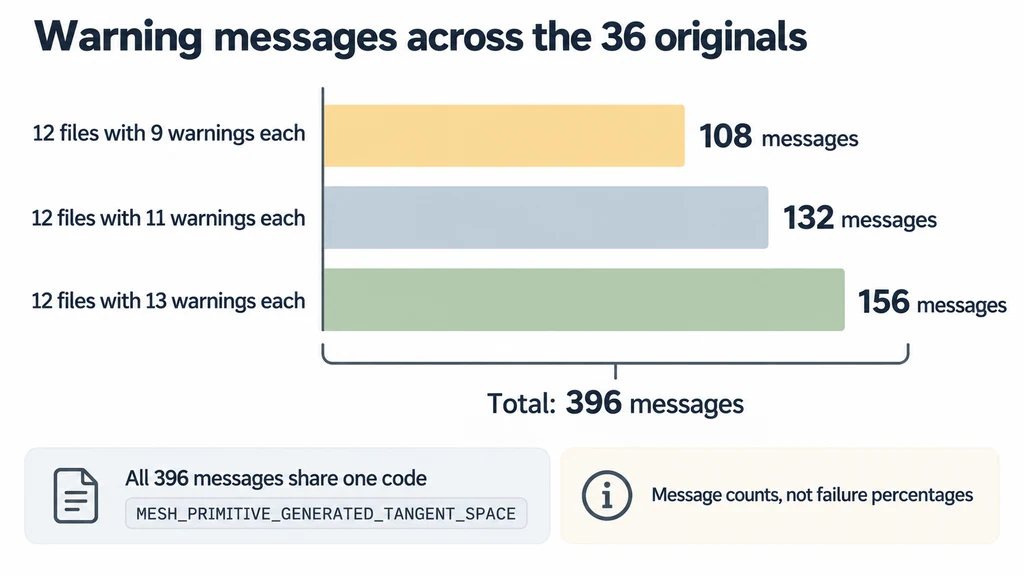
| Warning messages across the originals | 396 | 396 |
Twelve originals had nine warnings each, twelve had eleven, and twelve had thirteen. These are message counts, not failure percentages. All 396 warnings had the same code, MESH_PRIMITIVE_GENERATED_TANGENT_SPACE.
Open summary.csv in Excel to see each file's status, error count, warning count, asset hash, and report filename. It is a CSV file rather than an Excel workbook. The spreadsheet identifies which model needs attention; its individual .report.json supplies the explanation.
summary.json stores the batch results for software to read. manifest.json records the expected filenames and validator version. Preserve these files together so another reviewer can trace the findings.
The script returns exit code 1 for errors, unreviewed warnings, or failed checks. That is this script's conservative policy, not a statement that Khronos classifies every warning as an error. A batch can finish normally while still needing warning review.
Investigate the repeated tangent warnings
I opened the report for 689744.glb, which had nine warnings. In issues.messages, each warning included this code:
MESH_PRIMITIVE_GENERATED_TANGENT_SPACE
Khronos describes a material that requires tangent-space data absent from the mesh primitive. Runtime-generated tangent space may vary across implementations. Its issue reference explains that warning. Repeated messages point to affected primitives, rather than nine unrelated types of problem.
The supplied Blender build script connected a Normal Map node to the material, then exported GLB without explicitly enabling tangents. The saved Blender file identifies version 4.5 in its header. Blender's 4.5 exporter source sets export_tangents=False by default. That setting is a plausible cause in this workflow.
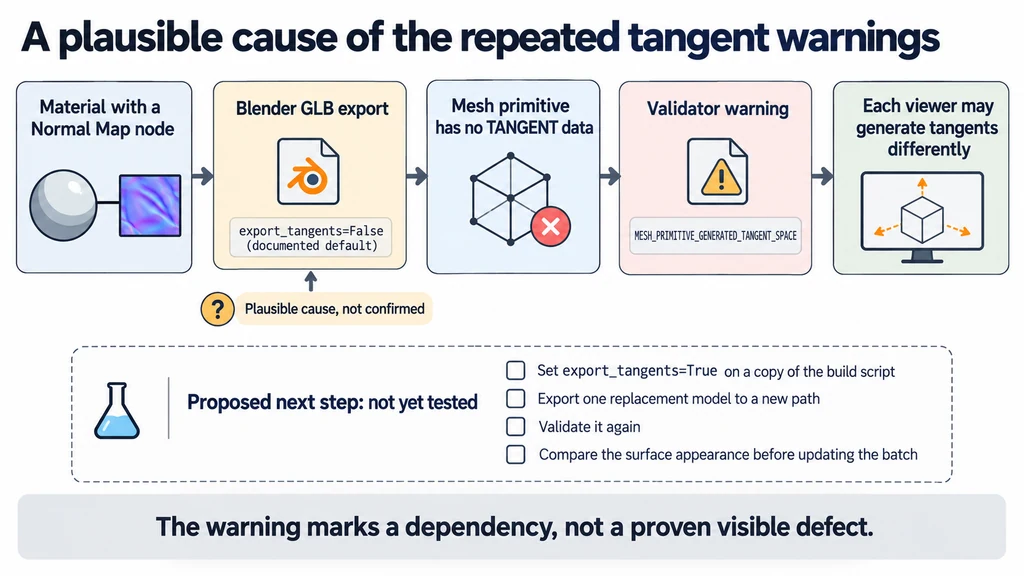
The warning does not establish that a visible defect exists. It identifies a dependency on how the target application generates the missing data. For delivery across several viewers, review the relevant surface details before accepting that dependency. Record any acceptance decision against the tested revision.
Detect a deliberately invalid GLB
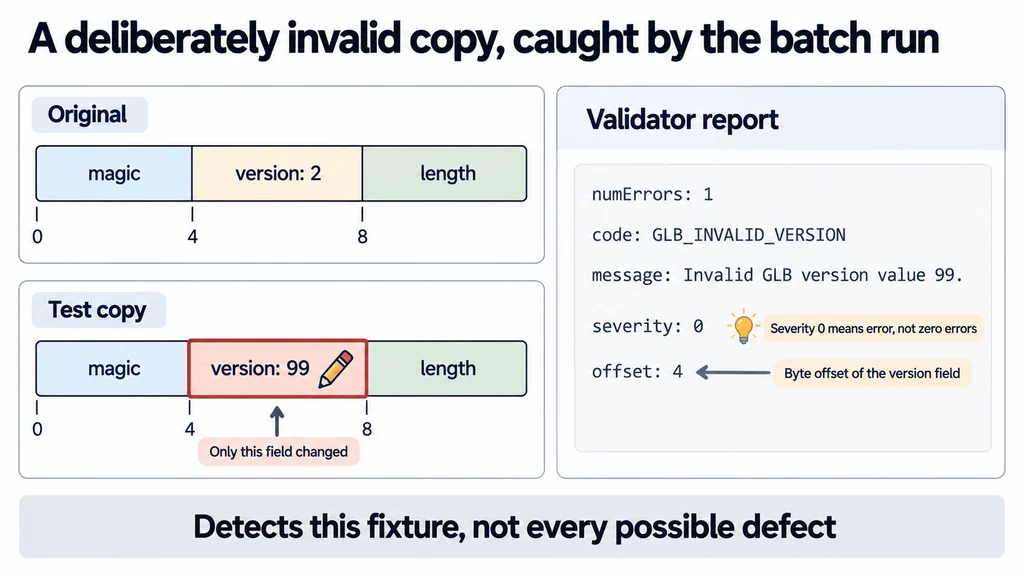
For the second run, we prepared invalid-version-test.glb as a separate copy of an original. The copy's header version changed from 2 to 99. The original stayed unchanged. This was a deliberately malformed file, not a different product variant.
I added the copy and repeated the same validation command. The script found 37 files and marked the copy ERRORS. Its issues object included:
{
  "numErrors": 1,
  "numWarnings": 0,
  "messages": [
    {
      "code": "GLB_INVALID_VERSION",
      "message": "Invalid GLB version value 99.",
      "severity": 0,
      "offset": 4
    }
  ]
}
numErrors counts errors. Within a message, severity 0 identifies an error; it does not mean zero errors. offset 4 identifies the byte offset of the invalid version field. Khronos lists GLB_INVALID_VERSION as an error in its issue reference.
To reproduce the fixture, save make-invalid-version.cjs beside the validation script and run:
node make-invalid-version.cjs ".\models\689744.glb"
Substitute your own GLB v2 filename. The helper writes invalid-version-test.glb beside it and refuses to overwrite an existing file. Re-run validation against that folder. Keep the deliberately invalid copy out of deliverable assets.
The result confirms that the batch process reached this malformed file and retained its error. It does not establish detection of every possible defect. A successful display in a tolerant viewer likewise does not establish acceptance by every consumer.
Separate the three release decisions
| Question | Evidence from this walkthrough |
|---|---|
| Does the file satisfy the validator's checks? | The individual JSON report, with issue codes and severities. |
| Does it satisfy the project's delivery budget? | Separate measurements of size, loading, memory, and interaction under named conditions. |
| Does it represent the product correctly? | A visual and dimensional review against the approved product reference. |
The 36 originals passed the recorded error check but all needed warning review. That result does not establish a frame rate, a correct physical size, or an approved material appearance. The malformed copy demonstrated one detectable structural failure.
Keep those conclusions with the experiment. Do not add a batch duration or claim that enabling tangent export repaired the assets until a recorded rerun supports it. For a later repaired batch, retain both report sets and compare the relevant surfaces in the destination viewer.
Improve the next export and retain the evidence
The repeated warnings point to a shared export step worth checking. For the supplied Blender build script, the proposed next change is to add this argument to its GLB export call:
export_tangents=True
Apply the change to a copy of the build script. Export one replacement model to a new path and validate it again. Check that the relevant primitives have suitable UV data and that tangent generation succeeds. Compare the intended surface appearance before updating the batch.
We had not completed that re-export or visual comparison when this walkthrough was written. The confirmed outcomes are the warning diagnosis and the invalid-version detection, not a demonstrated repair.
Keep the original reports, any warning acceptance decisions, and fresh reports for replacement assets. The findings support a production handoff, while product dimensions, materials, labels, and appearance still require review against the intended product and destination.